FlexClip: The Ultimate Online Video Editor for Creators in 2025
What is FlexClip?
FlexClip is a cloud-based video editing platform designed for quick and easy video creation. Launched by PearlMountain, FlexClip has become a go-to tool for marketers, educators, content creators, and small businesses.
Whether you need to make promotional videos, social media reels, YouTube intros, or educational videos, FlexClip offers a simple drag-and-drop interface to create high-quality videos without technical skills.
FlexClip Features Overview
FlexClip stands out in the crowded market of online video editors thanks to its feature-rich toolkit. Here’s what you get:
🎬 1. Drag-and-Drop Interface
FlexClip is beginner-friendly. No need to download software — everything runs in your browser.
🎞️ 2. Templates for All Needs
Over 5000+ professionally designed templates for business, weddings, real estate, vlogs, and more.
🖼️ 3. Stock Assets
Get access to millions of royalty-free stock videos, music, and photos powered by Storyblocks and Unsplash.
🎧 4. Music & Voiceover
Upload your own music or record a voiceover directly within FlexClip.
🛠️ 5. Powerful Editing Tools
- Trim, split, merge
- Text animations
- Motion graphics
- AI auto-subtitles
- Picture-in-picture
- Screen & webcam recorder
📐 6. Aspect Ratios for All Platforms
Supports all popular aspect ratios — 16:9 for YouTube, 9:16 for TikTok, 1:1 for Instagram, etc.
How to Use FlexClip (Step-by-Step Guide)
Creating a video on FlexClip is simple. Here’s a step-by-step breakdown:
Step 1: Sign Up or Log In
Go to flexclip.com and create a free account or log in.
Step 2: Choose a Template or Start from Scratch
Pick a ready-made template or click “Start from Scratch” for full creative control.
Step 3: Upload Your Media
Drag and drop your videos, images, and audio into the editor.
Step 4: Edit Your Video
- Add text, transitions, stickers
- Use stock footage if needed
- Trim or split clips
Step 5: Add Music or Voiceover
Choose background music or use the voice recorder.
Step 6: Export and Download
Choose the resolution (480p, 720p, 1080p) and download your video.
FlexClip Templates and Stock Assets
One of FlexClip’s strongest points is its massive library of editable templates and media assets.
Categories Include:
- Business promo
- YouTube intro/outro
- Real estate tours
- Educational lessons
- Wedding invitation videos
- Holiday greetings
- Social media stories
Stock Library Highlights:
- 4M+ royalty-free videos
- 1M+ photos
- 100K+ music tracks and sound effects
These resources save hours of editing time and are ideal for non-designers.
FlexClip for YouTubers, Marketers, and Businesses
FlexClip isn’t just for casual users. It’s a great tool for:
📹 YouTubers
- Create intros, outros, and vlogs
- Add animated text and lower thirds
- Use auto-subtitles for accessibility
📈 Marketers
- Run Facebook and Instagram ad campaigns
- Add branding with logos and watermarks
- Quickly edit testimonials and case studies
🏢 Businesses
- Training videos
- Product demos
- Internal communications
📚 Educators
- Create how-to videos
- Record lectures with screen capture
- Add captions and annotations
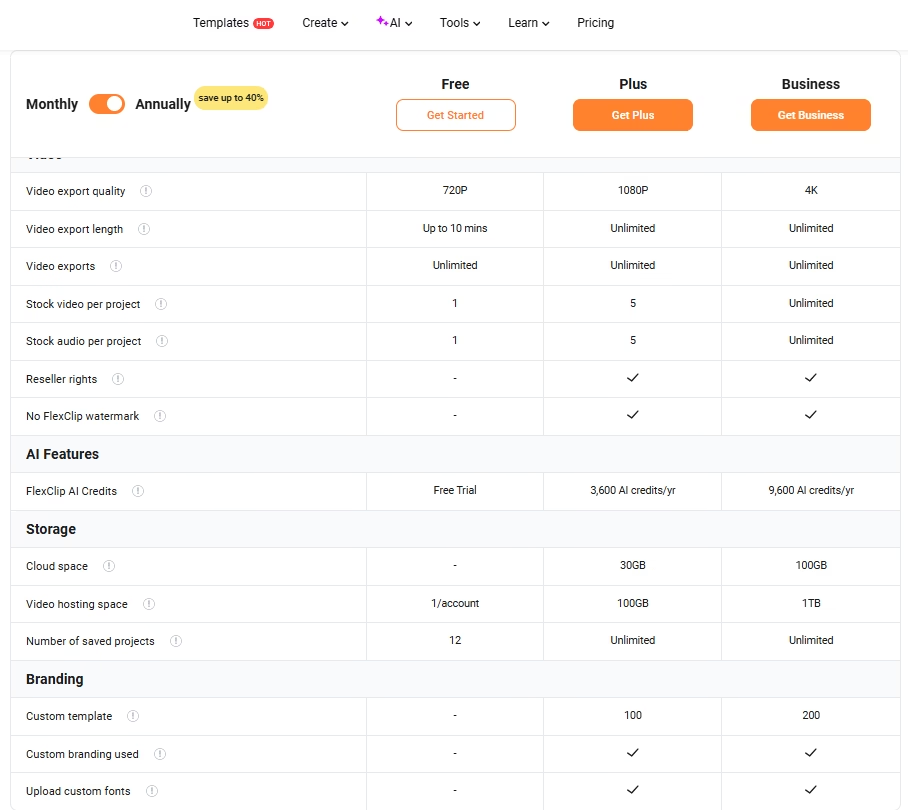
FlexClip Pricing Plans
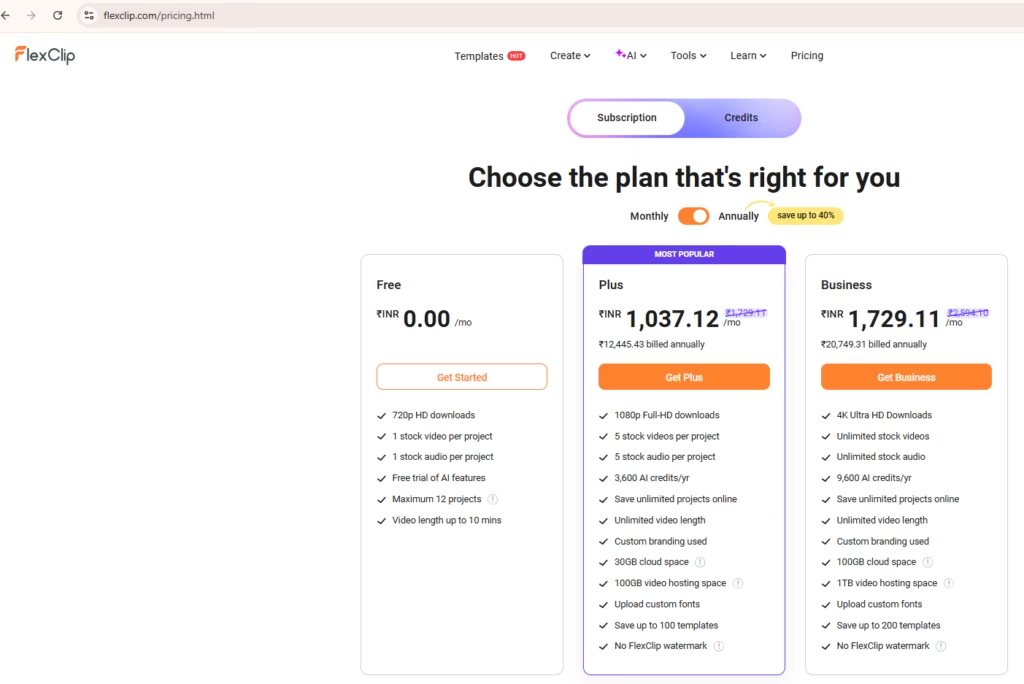
FlexClip offers flexible pricing plans suitable for individuals and teams:
| Plan | Monthly Price | Video Quality | Features |
|---|---|---|---|
| Free | $0 | 480p | 1 stock video/project, watermark |
| Basic | $9.99/mo | 720p | Up to 1 stock video/project, 3-min limit |
| Plus | $19.99/mo | 1080p | 5 stock videos/project, 10-min limit |
| Business | $29.99/mo | 1080p | Unlimited stock, 30-min limit, priority support |
Annual plans offer up to 50% savings.
FlexClip Pros and Cons
✅ Pros
- No software download needed
- Large template library
- Beginner-friendly interface
- Affordable pricing
- AI subtitle generator
- Great for YouTube & social media
❌ Cons
- Watermark on free plan
- Limited advanced effects (vs. Adobe Premiere)
- Internet connection required
FlexClip vs Other Video Editors
Let’s compare FlexClip with top alternatives:
| Feature | FlexClip | Canva Video | InVideo | Adobe Premiere Pro |
|---|---|---|---|---|
| Ease of Use | ★★★★★ | ★★★★☆ | ★★★★☆ | ★★☆☆☆ |
| Templates | 5000+ | 2000+ | 5000+ | None |
| AI Tools | Auto-subtitles | None | None | Limited |
| Best For | Beginners | Design focus | Ads & social | Professionals |
If you’re looking for a balance of simplicity and power, FlexClip is a solid choice in 2025.
User Reviews and Testimonials
Here’s what real users are saying:
⭐⭐⭐⭐⭐ “FlexClip helped me create a product demo in 15 minutes. Saved me from hiring an editor!” — Sarah T. (Small Business Owner)
⭐⭐⭐⭐ “Love the subtitle feature. Perfect for my Instagram reels!” — Jay M. (Fitness Coach)
⭐⭐⭐⭐⭐ “I use FlexClip to create YouTube intros and animated texts. Very intuitive and fast.” — Michael R. (YouTuber)
Final Verdict: Should You Use FlexClip in 2025?
Absolutely, yes! Whether you’re a beginner or a seasoned content creator, FlexClip makes video editing accessible, fast, and affordable.
With thousands of templates, a rich stock library, and tools for every content need, FlexClip is the best online video editor for:
- YouTube content creators
- Small business marketers
- Social media influencers
- Teachers and coaches
- Freelancers and solopreneurs
🔥 Why FlexClip Stands Out in 2025
- AI-powered subtitle generator
- Multi-track timeline editing
- Seamless video exports in HD
- Mobile support (limited editing)
For quick turnaround and professional-quality videos, FlexClip is your all-in-one solution.
FAQ on FlexClip
❓ Is FlexClip free?
Yes, FlexClip has a free version. But it includes a watermark and limited features. Paid plans remove these restrictions.
❓ Can I use FlexClip for commercial projects?
Yes, all paid plans allow commercial use of their stock assets.
❓ Does FlexClip work on mobile?
You can access FlexClip via mobile browsers, though the editing experience is better on desktop.
❓ Is FlexClip better than Canva or InVideo?
FlexClip offers more video-specific tools than Canva and is easier to use than InVideo for beginners.
🔗 Try FlexClip Today
👉 Visit FlexClip Official Website

1 thought on “FlexClip 2025 Review: Best Online Video Editor for Creators”